iTunes 10.4 Is Safe For Jailbreakers ok to update

Posted by DjRaz55 Friday, July 29, 2011 0 comments


NewImage

They have released Mac OS X Lion, released new updates to their popular Mac lineups, and have also pushed out an update for iTunes. Most of the times when Apple releases a new update for iTunes it is safe for Jailbreakers to upgrade. There have been incidents in the past, however, that have broken certain things with Jailbroken iDevices upon updating to a new version of iTunes. This requires further investigation from the Dev-Team. Luckily the latest version of iTunes, which was released today (iTunes 10.4), has been confirmed Jailbreak Safe and will not break anything while being used with a Jailbroken iDevice. We will let you know if anything comes up, but at this time iTunes 10.4 is safe for Jailbreakers. Meaning you can feel free to upgrade to iTunes 10.4. In the future, however, remember to always wait for a Jailbreak Safe confirmation before upgrading.

iOS 4.3.5 DO NOT UPDATE

Posted by DjRaz55 Monday, July 25, 2011 0 comments

NewImageDO NOT UPDATE!!! You will loose your jailbreak.

iOS 5’s on-device delta updates can’t come soon enough. Just a week and a half after releasingiOS 4.3.4, Apple has dropped iOS 4.3.5. Apple says that the new update fixes a security vulnerability with certificate validation.

The recently released iOS 4.3.4 focused on patching PDF vulnerabilities that some folks were using to jailbreak their devices, but could be exploited for more nefarious means, too.

As is the iOS update tradition of late, this patch comes in two different flavors: The 4.3.5 update applies to the iPad and iPad 2, the third- and fourth-generation iPod touch, the iPhone 3GS, and the iPhone 4 (GSM model); if you’re using a CDMA (Verizon) iPhone 4, you instead will upgrade to 4.2.10.


iOS 5 beta 4 pre-release

Posted by DjRaz55 Saturday, July 23, 2011 0 comments

Under eight hours. That was the time it took to jailbreak beta 3 of iOS 5, which dropped back on July 11th and was unleashed later that day. Now beta 4 is out and, well, our stopwatches are ticking. A new beta of iTunes has also been included, though looking through the change log there's nothing particularly amazing about this release. Among other minutia, the Twitter app will now prompt you if it's unable to identify your location before you exit it, MobileMe local contacts are deleted instead of being merged, and iCloud file names are now case sensitive. Yes, we can hear you CamelCase lovers cheering.


iTunes 10.4 DO NOT UPDATE!!!

Posted by DjRaz55 Thursday, July 21, 2011 0 comments

NewImage

Do not update your iTunes until it is confirmed that it is jailbreak friendly

NewImage

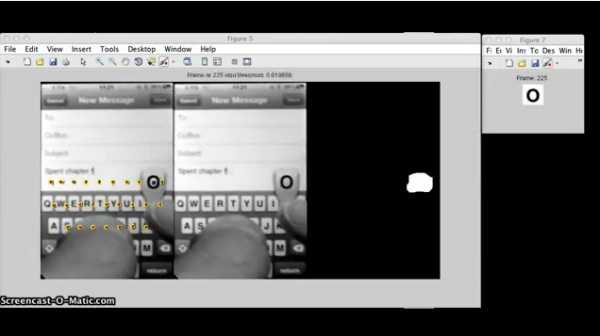
Here's something mildly terrifying to chew on: researchers in Italy have developed a way to automatically harvest anything you type on your smartphone's touchscreen, using only a camera placed over your shoulder. The software, created by Federico Maggi and his team from the Politecnico di Milano, takes advantage of the magnified touchscreen keys you'll find on most iOS, Android and BlackBerry devices. Because these magnifications often pop up in predictable positions, the spying system can recognize and record them with relative ease, with the help of a camera aimed at a targeted display. And it's not like bobbing and weaving around will help evade its watchful eye, since the apparatus can instantly detect sudden movements and adjust its gaze accordingly. Researchers say their tool is capable of accurately recognizing up to 97 percent of all keystrokes and is fast enough to transmit copied passwords in "quasi real-time," which must be music to a lazy criminal's ears. Tiptoe past the break to see the beast in action and spend the rest of your life in an everlasting state of fear.


iOS 4.3.4 Jailbreak is still tethered so do not update at this time..


NewImage

Apple has just pushed a new version of iOS, 4.3.4 (4.2.9 for the Verizon iPhone), and it looks to have "fixed" the PDF exploit that has been so notoriously exploited of late. In a summary of what's changed, Apple indicates that a fix has been applied that will prevent "arbitrary code execution" when viewing a "maliciously crafted PDF" -- business speak for "we broke your jailbreak, son." And, sure enough, you can see what happens after the break when trying to apply the latest. At this point we're not seeing any other updates or improvements but, really, now that you can view those malicious PDFs without fear on your iPhone or iPad 2, what more do you need?


NewImage

NewImage

Keep in mind that the jailbreak is tethered for now, in other words, if  your  device loses power or restarts then you would have to boot it into  the  jailbroken state again. No matter how annoying it may sound, but  its better  than having no jailbreak at all.

I will Post an update when iOS 4.3.4 becomes Untthered


NewImage

TinyUmbrella has reached the latest version 5, and is available for free download.

This version works on both operating systems, Microsoft Windows and Mac OX S.

TinyUmbrella is a tool that is able to allow users to downgrade their iOS version on iPhone 4, 3GS, iPad, iPad 2, iPod Touch Apple TV 2G by “signing” an older version of a firmware (SHSH blobs) and also allowing to build a custom .ipsw using these blobs.

This backup SHSH Blobs process can be also done using iFaith (no iPad 2 support yet), as a recovery tool released by iH8Sn0w.

Saving SHSH Blobs might be a smart idea prior to jailbreak a new iOS and probably indispensable for some beta versions, or with some unsure methods like jailbreaking iPad 2 on iOS 4.3.3. So, we are here to present a a way to backup a firmware running on your iPhone 4, 3GS, iPad, iPad 2, iPod Touch or Apple TV 2G.

How to save your SHSH Blobs using TinyUmbrella 5:

First of all, you’ll need to download TinyUmbrella 5 for Windows or Mac OS X, depending under what OS you’re running. Put the software to your desktop, and allow access as administrator.

Be sure you have closed iTunes before to connect your device to computer.

- Start TinyUmbrella 5 from your dektop

- Connect your device (iPhone 4, 3GS, iPad, iPad 2, iPod Touch or Apple TV 2G) to computer via USB. Wait for TinyUmbrella to recognize your device.

- After you’ve been detected by TinyUmbrella, navigate in the application on your iOS device and point to “Save SHSH”

- Select “Save SHSH”, hit it, and save it to your desktop. That’s all.

Download TinyUmbrella


NewImage


How To Backup/Save The iPad 2 iOS 4.3.3 SHSH Blobs Using TinyUmbrella 5 - Easy Tutorial

Hurry and backup your SHSH before iOS 5 is Released so you can restore you Device

See How Here


NewImage

The latest creation from modder extraordinaire Benjamin J. Heckendorn? This mashup of an Xbox 360,Maker Faire-provided Arduino board and a Sony CD changer lets gamers play their entire collection without ever needing to leave the couch again. The latest episode of The Ben Heck Show takes viewers through the build process in a bit under 19 minutes, but leaves the device still needing a bit of polish in the end. Sponsor element14 is offering motivated viewers a chance to with this and finish it off properly as they see fit, removing the hassle of L.A. Noire disc swaps once and for all without buying a PS3. The video, and press release with details on how to win the as-yet unfinished project for yourself, can be found after the break.


Modding Guru Pairs Xbox 360 and CD Disc Changer to Create the Ultimate "Lazy Man's" Gaming Tool in element14's "The Ben Heck Show"

Show commemorates element14's two-year birthday and gives viewers the opportunity to win and mod Ben's latest project

CHICAGO, July 11, 2011 /PRNewswire/ -- element14, the first collaborative community and electronics store for design engineers and electronics enthusiasts, and modding guru Benjamin J. Heckendorn, a.k.a. Ben Heck, create the ultimate "lazy man's" gaming tool on the latest episode of "The Ben Heck Show." The newest modding feat – an automatic video game disc changer – gives gaming junkies access to multiple discs at one time, resulting in uninterrupted game play.

"Let's face it – everyone calls us video gamers lazy. Not true, of course. I'm sure it's just a 'coincidence' that this particular build has been one of the more popular requests we've gotten for the show," said Ben. "Couch potatoes unite!"

The episode follows Ben's mechanically and electronically intricate build process, focusing on replacing the DVD drive in the Xbox 360™ with the changer's CD player and disc carousel and configuring the casing and components to ensure discs load properly into the player. Ben also spends a significant amount of time on programming, replacing the existing electronics to streamline the switches that control the CD cycle, as well as sensors that allow for the disc changer control.

"Modders and gaming enthusiasts alike will enjoy this episode, as it displays Ben's signature mix of ingenuity and practicality," said Kevin Yapp, chief marketing officer, Premier Farnell. "This episode also commemorates element14's second birthday, and I'd like to thank the viewers and fans of 'The Ben Heck Show' for helping to make the element14 community such a successful collaborative resource."

Another unique aspect of this episode is that Ben leaves the project unfinished, allowing viewers to enter for a chance to win the automatic video game changer to "mod Ben's mod" and finish the project to their own liking.

In honor of element14's two-year anniversary, 214 prizes will be awarded to new and existing community members during July. Show fans are invited to learn how they can win a Fluke Multimeter and other great giveaways.

About "The Ben Heck Show"

"The Ben Heck Show" is a bi-weekly online television series aired in English that's dedicated to the science and art of system and hardware modding with a global audience of design engineers, students and electronic enthusiasts. Sponsored exclusively by element14, each episode spotlights Ben's mods of popular electronic devices while educating viewers on the underlying technology powering each project.

About element14

Launched in June 2009, element14 is the first information portal, collaborative community and electronics store specifically built for electronic design engineers. The community recently unveiled its element14 knode, a unique automated platform that enables engineers to quickly research, design, develop and prototype in a single, intelligent environment. element14 is an innovative offering from Premier Farnell plc (LSE:pfl), FTSE 250, a leader in multi-channel electronics distribution trading throughout Europe (Farnell), the Americas (Newark) and Asia Pacific (element14). The company had group sales of 990.8m pounds Sterling and underlying profits of 93.3m pounds last year.

SOURCE element14
Back to top

RELATED LINKS
http://www.element14.com

Questions or Comments...


Your Name
Your Email
Subject
Message

About Me


Want something? Need something? Need to know how to do something that Apple, AT&T, or other companies may not want you to know? If you answered yes to any of these, your in the right spot... I prefer to stay anonymous as this could effect my paying job. So as far as everyone knows.. I am DJRaz55, which is me. Don't see what you need, feel free to email me. Email DJRaz55