Showing posts with label iOS4. Show all posts

NewImage

Sure, OS X Lion borrowed many of its design cues from Apple's iOS platform, but now users of jailbroken iPhone and iPod Touch devices may bring much of the desktop Mac's functionality onto their handset with Lion Ultimatum. In essence, this beta project is a theme for Dreamboard (which is required software), but it's rather far-reaching, with a functional file manager and Finder menus, a scrollable dock and draggable windows, along with Stacks, Launchpad, Mission Control and Dashboard. There's also a customizable lock screen that provides access to the dialer, email and messages. Even the keyboard can be modified to resemble the design of MacBook Pro or the traditional Apple Keyboard, thanks to integration with ColorKeyboard.


Install Instructions:

1) Open Cydia
2) Manage Sources
3) Edit/Add fnetdesigns.com/cydia/repo
4)Install the Theme Outlet (Found in the "Changes" section)
5)Go to homescreen and open Theme Outlet
6) Browse the the Theme and DL from there.
7) After selecting it in Dreamboard it will walk you through the steps to set it up.

***Do not forget to install the additional apps needed for the full experience***

Quicklock
CrazyDashboard
ArrangeStatusBar
CleanStatus

UPDATE: 9/20/11 The download site is down do to overload. I am also trying to find out where you can send donations to, from what i understand if you donate you will get a download link for the software. I will keep you posted.


UPDATE: 9/21/11 Here is a picture of the app downloaded from cydia. Still trying to contact the creator to get a trial.

IMG 0607


iOS 4.3.5 DO NOT UPDATE

Posted by DjRaz55 Monday, July 25, 2011 0 comments

NewImageDO NOT UPDATE!!! You will loose your jailbreak.

iOS 5’s on-device delta updates can’t come soon enough. Just a week and a half after releasingiOS 4.3.4, Apple has dropped iOS 4.3.5. Apple says that the new update fixes a security vulnerability with certificate validation.

The recently released iOS 4.3.4 focused on patching PDF vulnerabilities that some folks were using to jailbreak their devices, but could be exploited for more nefarious means, too.

As is the iOS update tradition of late, this patch comes in two different flavors: The 4.3.5 update applies to the iPad and iPad 2, the third- and fourth-generation iPod touch, the iPhone 3GS, and the iPhone 4 (GSM model); if you’re using a CDMA (Verizon) iPhone 4, you instead will upgrade to 4.2.10.


iOS 4.3.4 Jailbreak is still tethered so do not update at this time..


NewImage

Apple has just pushed a new version of iOS, 4.3.4 (4.2.9 for the Verizon iPhone), and it looks to have "fixed" the PDF exploit that has been so notoriously exploited of late. In a summary of what's changed, Apple indicates that a fix has been applied that will prevent "arbitrary code execution" when viewing a "maliciously crafted PDF" -- business speak for "we broke your jailbreak, son." And, sure enough, you can see what happens after the break when trying to apply the latest. At this point we're not seeing any other updates or improvements but, really, now that you can view those malicious PDFs without fear on your iPhone or iPad 2, what more do you need?


NewImage

NewImage

Keep in mind that the jailbreak is tethered for now, in other words, if  your  device loses power or restarts then you would have to boot it into  the  jailbroken state again. No matter how annoying it may sound, but  its better  than having no jailbreak at all.

I will Post an update when iOS 4.3.4 becomes Untthered


NewImage

TinyUmbrella has reached the latest version 5, and is available for free download.

This version works on both operating systems, Microsoft Windows and Mac OX S.

TinyUmbrella is a tool that is able to allow users to downgrade their iOS version on iPhone 4, 3GS, iPad, iPad 2, iPod Touch Apple TV 2G by “signing” an older version of a firmware (SHSH blobs) and also allowing to build a custom .ipsw using these blobs.

This backup SHSH Blobs process can be also done using iFaith (no iPad 2 support yet), as a recovery tool released by iH8Sn0w.

Saving SHSH Blobs might be a smart idea prior to jailbreak a new iOS and probably indispensable for some beta versions, or with some unsure methods like jailbreaking iPad 2 on iOS 4.3.3. So, we are here to present a a way to backup a firmware running on your iPhone 4, 3GS, iPad, iPad 2, iPod Touch or Apple TV 2G.

How to save your SHSH Blobs using TinyUmbrella 5:

First of all, you’ll need to download TinyUmbrella 5 for Windows or Mac OS X, depending under what OS you’re running. Put the software to your desktop, and allow access as administrator.

Be sure you have closed iTunes before to connect your device to computer.

- Start TinyUmbrella 5 from your dektop

- Connect your device (iPhone 4, 3GS, iPad, iPad 2, iPod Touch or Apple TV 2G) to computer via USB. Wait for TinyUmbrella to recognize your device.

- After you’ve been detected by TinyUmbrella, navigate in the application on your iOS device and point to “Save SHSH”

- Select “Save SHSH”, hit it, and save it to your desktop. That’s all.

Download TinyUmbrella


NewImage


How To Backup/Save The iPad 2 iOS 4.3.3 SHSH Blobs Using TinyUmbrella 5 - Easy Tutorial

Hurry and backup your SHSH before iOS 5 is Released so you can restore you Device

See How Here

iOS 4.3.4 DO NOT UPDATE you will loose your jailbreak

Posted by DjRaz55 Friday, July 8, 2011 0 comments

Use PDF Patch 2 Instead see Here

NewImage

If you’ve been keeping a close eye to the news over the last few days, you’re probably aware of JailbreakMe 3.0, a simple untethered jailbreak that takes advantage of a PDF exploit in Mobile Safari. The wizards in the jailbreak community have engineered a fix that manages to preserve the jailbreak, at the same time as it stops unsuspecting users from launching a harmful PDF and having their devices taken over.


This tweak is simple to apply and requires nothing more than an Internet connection. Just launch Cydia, search for “PDF Patcher 2″ and install the first (and, as of the time of this writing, only) result. The only thing you’ll need is a jailbroken iOS 4.3.3 device.


JailbreakMe 3.0 was first unintentionally leaked over the weekend and has since taken the jailbreaking community by storm, since it’s the first untethered jailbreaking solution for the iPad 2, although it also works with any iPod touch or iPhone. Unlike other tethered solutions, JailbreakMe doesn’t require the device to be plugged in, in order to be booted into a jailbroken state. The official version was then released to the public a few hours ago.

In order to mitigate this issue, Apple is said to be working around the clock to release iOS 4.3.4, a final update for iOS 4 before the final version of iOS 5 drops this fall. While the latter is a great priority for Apple, the company feels that a fix for the PDF exploit just can’t wait, since many customers would otherwise be left at risk. It’s important to remember that although the vulnerability is used by a very well-known jailbreaking tool, it can also be used to compromise the security of many users. Yet, it’s advisable that you skip iOS 4.3.4 and install PDF Patcher instead, since it has the same effect, yet it preserves your jailbreak.

Similarly to previous versions of JailbreakMe, this new version requires little to none iOS skills, or a computer connection. Those intending to jailbreak their devices simply need to launch Mobile Safari and point it to JailbreakMe.com. Within a few minutes, the device will be fully jailbroken.

You can now be confident that you’ll be safe from this nasty exploit and still maintain your jailbreak. With this fix, you can skip iOS 4.3.4 altogether, if it indeed becomes available.


Photo


NewImage

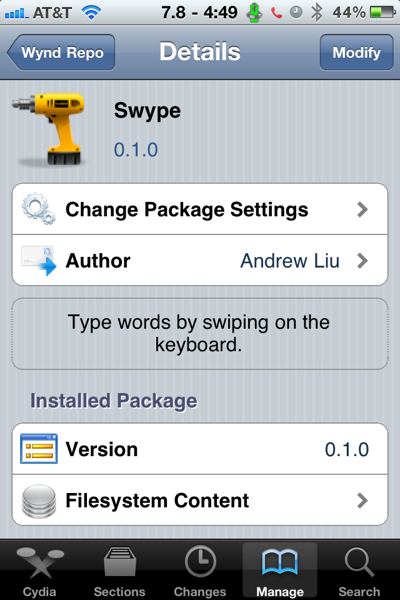
Those who’ve spent some time on the Android platform are probably aware of Swype, a tweak that lets users type on their virtual keyboards without ever lifting their fingers, by simply quickly swiping their finger across the keyboard over any letter in order to form a word, and only then releasing it. Fans of this tool should now be happy to know that Swype has now been unofficially ported to iOS.


With one continuous finger or stylus motion across the screen keyboard, the patented technology enables users to input words faster and easier than other data input methods—at over 40 words per minute.


Swype for iOS, although not official at this point, works similarly to the official version. After installing the tweak and restarting the device, users will immediately be able to type using this method. This tweak is still in beta form, therefore it’s expected to have its problems: for example, auto-correct often kicks in, although it’s not displayed, and will inadvertently change a word. That happens several times. If you’d like to type normally, you still can, even with Swype installed, although you’ll likely rather use the new method since it does a great deal to speed up your writing.

In order to install this, all you’ll need is a jailbroken iPod touch, iPhone or iPad, although we expect that this typing method will feel a lot more natural on smaller devices, not on large screens. In order to get it up and running, you’ll need to add the following repository to Cydia: wynd.x10.mx/repo

Photo

Jailbreakme.com version 3.0 now working on latest iOS

Posted by DjRaz55 Thursday, July 7, 2011 0 comments

The JailbreakMe.com website has returned to offer an entirely browser-based jailbreak tool for iOS devices including (for the first time) the iPad 2.


NewImage


Jailbreaking is a process by which Apple's iOS devices can be opened up to allow for installation of non-Apple-approved applications, customizations and file access. Apple officially disapproves of jailbreaking and has even warned users that these unauthorized modifications can cause "instability, disruption of services, and compromised security." Still, a large and active jailbreak community has emerged over the years since the iPhone's introduction.

A Dev-Team blog post outlines the supported configurations for JailbreakMe:


- iPad1: 4.3 through 4.3.3
- iPad2: 4.3.3 
- iPhoneGS: 4.3 through 4.3.3 
- iPhone4: 4.3 through 4.3.3 
- iPhone4-CDMA: 4.2.6 through 4.2.8 
- iPod touch 3g: 4.3, 4.3.2, 4.3.3 
- iPod touch 4g: 4.3 through 4.3.3


The JailbreakMe site is unique in that it allows users to jailbreak their devices entirely using the Safari browser and without downloading any additional software. The site itself also offers a Frequently Asked Questions page that reassures users that the jailbreaking process is fully reversible with a simple restore and that there is no risk for any permanent damage. Still, we'd recommend users proceed with caution. The installation process involves simply visiting JailbreakMe from a supported iOS device and tapping "Free/Install" button to initiate the jailbreak. 

The browser-based jailbreak process again exploits a flaw in Apple's PDF renderer that allows the tool to open up the device. Just like the previous vulnerability, Apple is expected to patch this one shortly. This same vulnerability could be exploited by malicious parties as well. The programmers of JailbreakMe are also providing a patch to close the security hole behind them for jailbroken users. Users of non-jailbroken iOS devices, however, will have to wait until Apple provides a fix.

Today’s PwnageTool and redsn0w incorporate @i0n1c’s port to 4.3.3 (it’s ironic that such a long-lasting untether doesn’t even have an official name!).  It also of course uses geohot’s limera1n bootrom exploit to inject the jailbreak. The 4.3.3 untether works on all devices that actually support 4.3.3 except for the iPad2:

  • iPhone3GS
  • iPhone4 (GSM)
  • iPod touch 3G
  • iPod touch 4G
  • iPad1
  • AppleTV2G (v4.3 8F202

NewImage

Earlier this week, iOS 4.3.3 was released to fix the much talked about iOS location tracking bug.

NewImageCydia running on iOS 4.3.3, iPhone 4 (GSM)

NOTE: Those of you who rely on a carrier unlock MUST STAY AWAY from Redsn0w and stock iOS 4.3.3 firmware. Instead use PwnageTool for Mac, or Sn0wbreeze for Windows.

Step 1: Download iOS 4.3.3 for your version of iOS device.

Step 2: Update/Restore to iOS 4.3.3 firmware using the IPSW file you just downloaded via iTunes 10.2.2.

Step 3: Start Redsn0w and point it to the official iOS 4.3.3 firmware file.

NewImage

NewImage

Step 4: Now select “Install Cydia” and click “Next”. Optionally (if available), you can also select any other option you like.

NewImage

Step 5: Now make sure your device is both OFF and PLUGGED IN to the computer before you click “Next”.

NewImage

At this stage you will be presented with a screen where you will be guided on how to enter DFU mode. Quickly hold “Power” button and then while holding the “Power” button, you will now have to hold “Home” button too. Now after few seconds release “Power” button but keep holding “Home” button until installation begins.

NewImage

Step 6: Sit back and enjoy while Redsn0w does the rest for you. Once done, your iPhone, iPad or iPod touch will restart automatically and you will find it fully jailbroken (untethered) on the latest iOS 4.3.3 firmware.


Direct Download Links for iOS 4.3.3 / 4.2.8 (Official from Apple)


Download Redsn0w 0.9.6rc15

Update: Redsn0w 0.9.6rc16 has been released, the download links have been updated to reflect this.

Mac & Windows versions are available, these are direct download links:

iOS 4.2 DO NOT UPDATE You may loose you unlock

Posted by DjRaz55 Monday, November 15, 2010 0 comments

Do not update you might loose your unlock


Thanks
DJRaz55
For the latest updates follow@DJRaz55 on Twitter.


Your iPhone's passcode entry can't block everything, it seems -- at least not with iOS 4.1. We're hearing various reports that simply inputting a random number in the emergency call field and then promptly hitting the hardware lock button will take you to the Phone app, thereby granting you access to the call history, voicemail, and address book. We've tried this with iPhone 3G, 3GS, and 4, all with the same result. We can't get out of the field without trying to place a call, and after that we're still stuck back at the passcode screen. Additionally, selecting "share contact" and then the camera icon will give you access to the photo album. Pay mind that your particularly paranoid pals could probably use this to see if you really did stop calling your ex and delete all his or her pictures. We won't judge, but they will. Video proof of concept after the break.

Update: Feel free to hold down the menu button to access voice control and play some locally-stored tunes while you're at it. And if you've got 4.2 beta like some of our staffers do, this "trick" should work just the same.

Thanks
DJRaz55
For the latest updates follow@DJRaz55 on Twitter.

PwnageTool 4.1.2 jailbreak iOS 4.1 Mac RELEASE

Posted by DjRaz55 Friday, October 22, 2010 0 comments


PwnageTool 4.1.2 for Mac OS X (free of charge, blog ads, and donation requests — as always!). Today’s big new addition to the jailbreak family is AppleTV 2G, which was first shown jailbroken in its release week!

[Update: Version 4.1.2 should fix any issues that OS X 10.5.x users were seeing. You only need to run this version if you’re at OS X 10.5.x and were seeing Cydia errors]

ULTRASN0W UNLOCKERS BEWARE!! ULTRASN0W UNLOCKERS BEWARE!! The biggest mistake you can make (and it is a big one!) is lettings iTunes restore to the official IPSW — you’ll lose the unlock and won’t be able to go back! You must use Option-Restore, not just the Restore button by itself. Then navigate to your custom IPSW — not to the stock one! If you accidentally started a restore to the official IPSW, unplug your iPhone immediately before the restore gets to the “Updating Firmware” step!

Through a combination of the recently released geohot limera1n exploit , @comex’s recently released pf kernel exploit, and our original pwnage2 exploit, PwnageTool 4.1 4.1.2 works untethered on these devices at firmware 4.1:

AppleTV 2G
iPad (firmware 3.2.2)
iPod touch 4G
iPod touch 3G
iPhone4
iPhone 3GS
iPhone 3G
PwnageTool allows you to restore to a custom IPSW file. For instance, you can restore to a pre-jailbroken firmware while simultaneously maintaining your current baseband (and thus your ultrasn0w carrier unlock). You can also add whatever packages you want in the “Expert” mode of PwnageTool, if you wish to pre-install Cydia packages. iPhone 3G users get the additional benefit of selecting their own boot and recovery logos, and features like multitasking and battery charge percentage.

PwnageTool’s main advantage to ramdisk-based methods (limera1n, greenpois0n, redsn0w) is for unlockers — those that need to keep their current baseband and preserve their ultrasn0w unlock. But in this new age of both bootrom- and userland-based exploits, it’s an excellent platform for continuing the jailbreak through all future firmwares. More on this later! In the meantime, please enjoy this free software and please provide any usage feedback in our comment section below.

AppleTV 2G users: Welcome to the JB family! Right now, about all you can do is command-line stuff via ssh. You also have afc2 available, so you can use tools like ifunbox to move files around. These are the *very* early days of AppleTV 2G jailbreaking, so it’ll take some time for JB app developers to come up with methods to use your AppleTV 2G from the remote, versus the command line. PS: Your ssh password is “alpine”…please change it when you can :)

Expert mode: By popular demand, the IPSW file selection in Expert mode is now completely manual (doesn’t use Spotlight). Just pick your IPSW file directly instead of waiting for the Spotlight search to complete. In Expert mode, the default is to hacktivate (“Activate the iPhone”), so if you have a legit SIM card be sure to deselect that option in Expert mode.

DFU button: That “DFU” button in PwnageTool is more than it looks like. It guides you through the DFU process, but then also runs the appropriate exploit to convince your device and iTunes that all is legit. The DFU button in PwnageTool is not just your average DFU.

Official Bittorrent Releases

PwnageTool 4.1.2 Torrent - PwnageTool_4.1.2.dmg.5904259.TPB.torrent

PwnageTool 4.1 jailbreak iOS 4.1 Mac RELEASE

Posted by DjRaz55 Wednesday, October 20, 2010 0 comments


PwnageTool 4.1 for Mac OS X (free of charge, blog ads, and donation requests — as always!). Today’s big new addition to the jailbreak family is AppleTV 2G, which was first shown jailbroken in its release week!

Through a combination of the recently released geohot limera1n exploit , @comex’s recently released pf kernel exploit, and our original pwnage2 exploit, PwnageTool 4.1 works untethered on these devices at firmware 4.1:

AppleTV 2G
iPad (firmware 3.2.2)
iPod touch 4G
iPod touch 3G
iPhone4
iPhone 3GS
iPhone 3G

PwnageTool allows you to restore to a custom IPSW file. For instance, you can restore to a pre-jailbroken firmware while simultaneously maintaining your current baseband (and thus your ultrasn0w carrier unlock). You can also add whatever packages you want in the “Expert” mode of PwnageTool, if you wish to pre-install Cydia packages. iPhone 3G users get the additional benefit of selecting their own boot and recovery logos, and features like multitasking and battery charge percentage.

PwnageTool’s main advantage to ramdisk-based methods (limera1n, greenpois0n, redsn0w) is for unlockers — those that need to keep their current baseband and preserve their ultrasn0w unlock. But in this new age of both bootrom- and userland-based exploits, it’s an excellent platform for continuing the jailbreak through all future firmwares. More on this later! In the meantime, please enjoy this free software and please provide any usage feedback in our comment section below.

AppleTV 2G users: Welcome to the JB family! Right now, about all you can do is command-line stuff via ssh. You also have afc2 available, so you can use tools like ifunbox to move files around. These are the *very* early days of AppleTV 2G jailbreaking, so it’ll take some time for JB app developers to come up with methods to use your AppleTV 2G from the remote, versus the command line. PS: Your ssh password is “alpine”…please change it when you can :)

Expert mode: By popular demand, the IPSW file selection in Expert mode is now completely manual (doesn’t use Spotlight). Just pick your IPSW file directly instead of waiting for the Spotlight search to complete. In Expert mode, the default is to hacktivate (“Activate the iPhone”), so if you have a legit SIM card be sure to deselect that option in Expert mode.

DFU button: That “DFU” button in PwnageTool is more than it looks like. It guides you through the DFU process, but then also runs the appropriate exploit to convince your device and iTunes that all is legit. The DFU button in PwnageTool is not just your average DFU.

Official Bittorrent Releases

PwnageTool 4.1 Torrent - PwnageTool_4.1.dmg.5904259.TPB.torrent


Thanks
DJRaz55
For the latest updates follow@DJRaz55 on Twitter.


iOS 4.1.1 DO NOT UPDATE

Posted by DjRaz55 Tuesday, October 12, 2010 0 comments


The iOS 4.1.1 update is expected to be released soon by Apple. According to ZDNet, the current version of the iOS 4.1 software has a daylight savings bug which Apple says it will fix and release in an upcoming update.
The limera1n jailbreak was recently released, causing the greenpois0n jailbreak with SHAtter exploit to be delayed. Apple may be patching up the “untethered” part of the exploit used in limera1n once iOS 4.1.1 comes out, so it’s good that greenpois0n SHAtter exploit was saved. If you are using limera1n, remember to stay away from iOS 4.1.1 update as it’s just a minor update.

Update: By patched I mean that the untethered part of the jailbreak can be patched. You can still jailbreak your device and have it tethered, but that would be really annoying because you’d need to connect your device to your computer every time you reboot it.


Thanks
DJRaz55
For the latest updates follow@DJRaz55 on Twitter.


The greenpois0n iOS 4.1 jailbreak for iPhone 4, iPhone 3GS, iPod touch 4G/3G and iPad has now been released by Chronic Dev Team. Finally! The greenpois0n jailbreak was originally supposed to be released on 10/10/10 at 10:10:10 AM GMT but was delayed due to limera1n being released. The greenpois0n jailbreak team had to save the SHAtter exploit, and instead use the USB bootrom exploit that Geohot used in the limera1n jailbreak.

Currently the greenpois0n software is only available for Windows users only, and can be downloaded from the greenpois0n download page. If you try it, do let us know how it works for you in the comments. If you are a limera1n user and you try greenpois0n, let us know which one you liked better.

Greenpois0n will be available for Mac and Linux too, but no ETA has been announced for these platforms. I’ve installed Windows 7 via Bootcamp on my Mac so I can use greenpois0n. If you are a Mac user and you can’t wait for the release then you can also try virtualization software like VMWare or Crossover (unfortunately they are not free, Google it) to use greenpois0n.

Greenpois0n is currently in RC3

If greenpois0n doesn’t install Cydia for you then you can try using limera1n instead, which worked for me.


greenpois0n Download


Windows download (.EXE download) - Click here


Mac download (.ZIP download) – Click here


Linux download (.ZIP download) – Click here

Disclaimer: We are not responsible for anything that happens to your device as a result of using greenpois0n. Jailbreaking your device voids your warranty with Apple.

How to use greenpois0n

Don’t know how to use greenpois0n? See the links below for step-by-step tutorials.

Jailbreak iPhone 4 on iOS 4.1 (Tutorial) – NOT OUT YET

Jailbreak iPad 4.0 (Tutorial) – NOT OUT YET

Jailbreak iPod touch 4th/3rd generation (Tutorial) - NOT OUT YET


Thanks
DJRaz55
For the latest updates follow@DJRaz55 on Twitter.


limera1n iOS 4.1 jailbreak Mac & Windows

Posted by DjRaz55 Sunday, October 10, 2010 0 comments


The well-known iPhone hacker George Hotz aka Geohot has finally released the limera1n jailbreak for iPhone 3GS 4.1/4.0/4.0.2/4.0, iPhone 4 4.1/4.0/4.0.2/4.0, iPod touch 3G 4.1/4.0/4.0.2/4.0, iPod touch 4G 4.1/4.0/4.0.2/4.0, and iPad 3.2.2 hardware. Currently limera1n only works on windows and mac.


Windows & Mac Download - Click here


How to use limera1n

Not sure how to use limera1n? Click on the link below for a step-by-step tutorial.

Jailbreak iPhone 4.0 with limera1n (Tutorial) – NOT OUT YET

Jailbreak iPad 4.0 with limera1n (Tutorial) – NOT OUT YET

Jailbreak iPod touch 4.0 with limera1n (Tutorial) - NOT OUT YET


Thanks
DJRaz55
For the latest updates follow@DJRaz55 on Twitter.


Right about now the greenpois0n iOS 4.1 jailbreak download was supposed to be released, but unfortunately it wasn’t. The Chronic Dev Team decided to save the SHAtter exploit for a future jailbreak and implement another exploit in the greenpois0n jailbreak tool. The reason for this is because another iPhone hacker, Geohot, released his own jailbreak called limera1n which used a different exploit. If Chronic Dev Team released greenpois0n now then Apple can easily patch both exploits and Apple will easily win the cat and mouse game. Thankfully Chronic Dev Team decided to play it safe and now they are working to get greenpois0n out ASAP.


Thanks
DJRaz55
For the latest updates follow@DJRaz55 on Twitter.

Unlocked iPhone's BEWARE

Posted by DjRaz55 Saturday, October 9, 2010 0 comments

If you have a unlocked iPhone probably on a carrier other than AT&T like T-Mobile do not update to iOS 4.1 you will loose your ultrasn0w unlock and not be able to use your phone unless it is on AT&T. The unlock for 4.1 may come later.


Thanks
DJRaz55
For the latest updates follow@DJRaz55 on Twitter.

Questions or Comments...


Your Name
Your Email
Subject
Message

About Me


Want something? Need something? Need to know how to do something that Apple, AT&T, or other companies may not want you to know? If you answered yes to any of these, your in the right spot... I prefer to stay anonymous as this could effect my paying job. So as far as everyone knows.. I am DJRaz55, which is me. Don't see what you need, feel free to email me. Email DJRaz55