

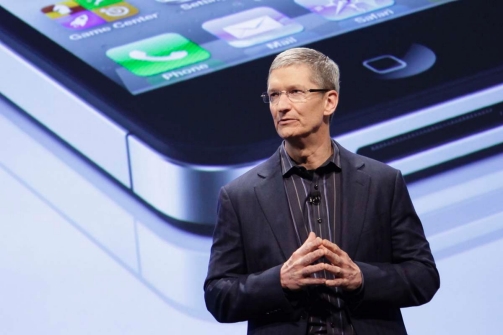
Apple's next big media event will be held on October 4th, where freshly minted CEO Tim Cook is expected to unveil theiPhone 5. Sources close to the situation say Cook will be the main presenter at the event, with execs Phil Schiller, Scott Forstall and Eddy Cue playing supporting roles. This would mark the first time that Cook has actually led an Apple event, adding an extra wrinkle of significance to an already highly anticipated occasion. The site's sources went on to say that the next-gen iPhone will be available for purchase "within a few weeks" of the announcement, The exact date of its unveiling is still subject to change.
Showing posts with label ATT. Show all posts
Showing posts with label ATT. Show all posts
Apple to hold media event on October 4th, Tim Cook to unveil iPhone 5
Wednesday, September 21, 2011
0
comments

Sure, OS X Lion borrowed many of its design cues from Apple's iOS platform, but now users of jailbroken iPhone and iPod Touch devices may bring much of the desktop Mac's functionality onto their handset with Lion Ultimatum. In essence, this beta project is a theme for Dreamboard (which is required software), but it's rather far-reaching, with a functional file manager and Finder menus, a scrollable dock and draggable windows, along with Stacks, Launchpad, Mission Control and Dashboard. There's also a customizable lock screen that provides access to the dialer, email and messages. Even the keyboard can be modified to resemble the design of MacBook Pro or the traditional Apple Keyboard, thanks to integration with ColorKeyboard.
Install Instructions:
1) Open Cydia
2) Manage Sources
3) Edit/Add fnetdesigns.com/cydia/repo
4)Install the Theme Outlet (Found in the "Changes" section)
5)Go to homescreen and open Theme Outlet
6) Browse the the Theme and DL from there.
7) After selecting it in Dreamboard it will walk you through the steps to set it up.
***Do not forget to install the additional apps needed for the full experience***
Quicklock
CrazyDashboard
ArrangeStatusBar
CleanStatus
UPDATE: 9/20/11 The download site is down do to overload. I am also trying to find out where you can send donations to, from what i understand if you donate you will get a download link for the software. I will keep you posted.
UPDATE: 9/21/11 Here is a picture of the app downloaded from cydia. Still trying to contact the creator to get a trial.


Judging from the clandestine screenshot you see above, it most certainly seems like that's the case. A helpful tipster sent us this tasty morsel, from AT&T's internal system, listing the "iPhone 4s White" beneath a handful of already familiar Apple handsets. Could it be? Is Cupertino actually planning on bringing a white version of its next iPhone out at launch? We're afraid only time will tell.

Earlier this year, Verizon CEO Dan Mead all but confirmed that an LTE Apple device would be making its way to Verizon. Eventually. And no 2011 Apple rumor spattering would be complete without at least a casual mention of the high-speed 4G network. Now, BGR claims to have received an internal iOS test build from a major carrier, revealing a property list file for LTE. This of course doesn't guarantee that Apple will be shipping an LTE iPhone flavor later this year, but that it at least remains a possibility. Still, an October iPhone launch would fall nicely in line with recent confirmation that AT&T will be releasing an LTE smartphone in "late 2011," and 4G compatibility could definitely explain Cupertino's holdup in announcing the iPhone 4's successor. So, will you be flying through the wireless web at lightning-fast speed later this year? Hopefully we need not wait much longer to find out.

Ok. So let me clear up a few things before I get into any more details so everyone can know what's going on.
If you don't know by now, I'm rockin an iPhone 4. Yes, it's the best phone in the market, hands down. This post is not a debate of that topic. The problem came about a few weeks ago, when I got an email from AT&T saying:
"Did you know tethering your Smartphone to a computer requires a tethering plan? Pls call 866-679-7118 for details or visit att.com/dataplans"
Ok, so tethering is basically giving internet to your laptop, iPod, XBox, PS3 or any other device that can use the internet wirelessly. Thing is, AT&T provides this service for a fee, per phone, and it's limited to 4gig monthly. Being a web developer, I can really benefit from tethering but I could do without the extra bill. Other catch is, being a long time iPhone customer with AT&T, I have been grandfathered into an unlimited data plan for $30 monthly. Thats $30 a month for unlimited data (not available on new plans), compared to $25 monthly for 2 gigs and $15 for 200 mb and if you go over the data limit, they charge you $10 for an extra gig of data.
To me, it seems like those plans are not very friendly and don't give you alot of options. So I will stick with my unlimited plan. And also, it's very unsettling to me how they are able to know that you are tethering your device anyways. Some people say it's cause you use too much data.... well if I have an unlimited data plan, what is too much data? So if I accept that, then I can still argue, all the data is coming from the phone. How do they know otherwise? Well, they can possibly tell the browser you're using as well. Browsers sent their info when sending packets over the network. But still, I can fake the user agent of any browser and that is not a good enough reason.
The one way that I can think of, that they can legally see what I'm doing on my machine and that it is actually tethering, is that the MAC address of the other devices are passed with the packets and with this I think they can determine that other devices were used, tethered through the phone. This is the "fix" that I am suggesting with the instructions below. Beyond the MAC addresses, I would say they have to literally invade my privacy and
Now, by making some changes to your iPhone, you can "jailbreak" it. What this does is allow you to make changes to the phone's system that are not initially allowed by either AT&T or Apple. Maybe you like people to control your belongings even after you paid money to buy it from them, but I don't. I love technology and being able to "play around" with the things in the background of the system are very beneficial. It's the same with others though. Example is Microsoft's XBox... You can't even use the bluetooth devices you may have already paid alot of money for with the system due to the restrictions. However, I think you can "mod your XBox" to get this setup.
Anyways, for the real reason you're here... you want to find a way to get around AT&T punishing you for using your own, paid for internet data. Well below, I show you how by using MyWi and PocketProxy.

Steps
1. Get PocketProxy from the App Store now before they read this post and realize what good it will be used for (they did it with the netshare app - Google it)
2. Jailbreak you phone (if not already) and purchase and install MyWi
3. Once the first two steps are complete, start up MyWi and turn on wireless tethering.
4. Minimize this app (it should run in the background)
5. Open the PocketProxy app and start it
6. On the macnine you want to access the internet on, go to the browser and enter the proxy settings. If possible, change the proxy for the entire machine
PS. If you want to have PocketProxy run in the background, get the Backgrounder app and set it to run as if in the foreground. Then you can minimize the app once it's started and still browse at the same time.
PPS. Of course this can't exactly be verified by an AT&T employee but this should send all packets that are tethered through the proxy, thus any data on the other end should be hidden and only be passed using the iPhone's MAC address.
Thats it.

There's a war on unlimited data being fought as we speak, and Ma Bell is leading the main charge. Just days after AT&T announced it would begin throttling data speeds for the heaviest bandwidth hogs grandfathered into the carrier's no-limit internet service, it's also confirmed it's ready to crack the whip on illegal tethering as well. In attempt to achieve "fairness for all of [its] customers," the carrier has added a bit of force behind its March announcement, sending out notices to anyone using their jailbroken iPhones as a mobile hotspot. The gist? Cut it out or be scaled back to a tiered data plan. In a statement originally given to 9to5mac, an AT&T spokesperson said:
Earlier this year, we began sending letters, emails, and text messages to a small number of smartphone customers who use their devices for tethering but aren't on our required tethering plan. Our goal here is fairness for all of our customers. (This impacts a only small percentage of our smartphone customer base.)
The letters outline three choices:
1. Stop tethering and keep their current plan (including grandfathered unlimited plan)
2. Proactively call AT&T or visit our stores and move to the required tethering plan 3. Do nothing and we'll go ahead and add the tethering plan on their behalf - after the dated noted in their customer notification
AT&T confirmed that this statement is indeed true. Consider this the company's last warning -- your time to enjoy all-you-can-eat tethering is almost at an end. How soon the day of reckoning will come, however, likely depends on when you received the notification originally. And you thought you were being so sneaky...
If you’ve gotten AT&T’s “text of death” relating to your tethering usage, you’re probably utilizing free tethering through jailbreak apps like MyWi. Understandably, AT&T doesn’t want its users to have a free broadband connection through tethering hacks, and the carrier has started moving users over to its DataPro plan for $45 a month.
So, how is AT&T targeting unauthorized tethering on its network?
“Jailbroken iPhones typically use the same tethering technique as a standard iPhone, the one that’s already present in iOS. This method exposes tethering activity quite readily, because the iPhone, when in tethering mode, sends traffic through an alternate APN (AT&T access point/router) for the express purpose of identifying the traffic as tethered data. This makes it extremely easy for AT&T to identify whether or not an iOS device is utilizing tethering, and just how much of their data is consumed via tethering.
Some tethering applications for iOS make use of alternative methods and route tethered traffic through the phone’s normal data APN, but by and large, most jailbreakers stick with the stock application because it’s easy to use and doesn’t require any complicated setup. In fact, many iPhone users jailbreak for the sole purpose of avoiding AT&T’s tethering fees (for why, see next section). These are the people AT&T’s is going after.”
Because MyWi, the most popular tethering alternative for jailbreakers, uses the same APN as the standard tethering system for iOS, AT&T can see a jailbroken iPhone’s tethering activity very easily. AT&T has been contacting its list of unauthorized tethering users in waves, and there are no signs that the warnings from AT&T will stop anytime soon.
The people getting targeted by AT&T are obviously those with a grandfathered unlimited data plan. If you’re fortunate enough to still have an unlimited data for your iPhone, you can tether till your heart’s content through methods like MyWi and never have to worry about going over on your bill. AT&T doesn’t like that jailbreakers are able circumvent their $45 system for tethering.
There are other options for tethering in Cydia. PdaNet is an alternative to MyWi that has anew option to “hide” your tethering usage, assumedly redirecting you to the regular APN that the iPhone uses for data. If PdaNet does indeed mask your data from being sent through AT&T’s tethering APN, then AT&T should have no way of distinguishing unauthorized tethering data from regular data.
TetherMe is another popular tethering solution for jailbreakers that hasn’t gotten much attention in this whole AT&T debacle. From what we’re hearing, TetherMe users are reporting that they haven’t gotten contacted from AT&T about any sort of unauthorized tethering. However, this doesn’t mean that TetherMe users will not be contacted by AT&T soon.
As of right now, it seems that the updated version of PdaNet is your best bet for safe, free tethering on a jailbroken iPhone. Although AT&T does mainly use APNs to distinguish different types of data, your carrier could also be able to sniff data packets to see different types of traffic.
 Want something? Need something? Need to know how to do something that Apple, AT&T, or other companies may not want you to know? If you answered yes to any of these, your in the right spot... I prefer to stay anonymous as this could effect my paying job. So as far as everyone knows.. I am DJRaz55, which is me. Don't see what you need, feel free to email me.
Email DJRaz55
Want something? Need something? Need to know how to do something that Apple, AT&T, or other companies may not want you to know? If you answered yes to any of these, your in the right spot... I prefer to stay anonymous as this could effect my paying job. So as far as everyone knows.. I am DJRaz55, which is me. Don't see what you need, feel free to email me.
Email DJRaz55
