NewImage

The latest creation from modder extraordinaire Benjamin J. Heckendorn? This mashup of an Xbox 360,Maker Faire-provided Arduino board and a Sony CD changer lets gamers play their entire collection without ever needing to leave the couch again. The latest episode of The Ben Heck Show takes viewers through the build process in a bit under 19 minutes, but leaves the device still needing a bit of polish in the end. Sponsor element14 is offering motivated viewers a chance to with this and finish it off properly as they see fit, removing the hassle of L.A. Noire disc swaps once and for all without buying a PS3. The video, and press release with details on how to win the as-yet unfinished project for yourself, can be found after the break.


Modding Guru Pairs Xbox 360 and CD Disc Changer to Create the Ultimate "Lazy Man's" Gaming Tool in element14's "The Ben Heck Show"

Show commemorates element14's two-year birthday and gives viewers the opportunity to win and mod Ben's latest project

CHICAGO, July 11, 2011 /PRNewswire/ -- element14, the first collaborative community and electronics store for design engineers and electronics enthusiasts, and modding guru Benjamin J. Heckendorn, a.k.a. Ben Heck, create the ultimate "lazy man's" gaming tool on the latest episode of "The Ben Heck Show." The newest modding feat – an automatic video game disc changer – gives gaming junkies access to multiple discs at one time, resulting in uninterrupted game play.

"Let's face it – everyone calls us video gamers lazy. Not true, of course. I'm sure it's just a 'coincidence' that this particular build has been one of the more popular requests we've gotten for the show," said Ben. "Couch potatoes unite!"

The episode follows Ben's mechanically and electronically intricate build process, focusing on replacing the DVD drive in the Xbox 360™ with the changer's CD player and disc carousel and configuring the casing and components to ensure discs load properly into the player. Ben also spends a significant amount of time on programming, replacing the existing electronics to streamline the switches that control the CD cycle, as well as sensors that allow for the disc changer control.

"Modders and gaming enthusiasts alike will enjoy this episode, as it displays Ben's signature mix of ingenuity and practicality," said Kevin Yapp, chief marketing officer, Premier Farnell. "This episode also commemorates element14's second birthday, and I'd like to thank the viewers and fans of 'The Ben Heck Show' for helping to make the element14 community such a successful collaborative resource."

Another unique aspect of this episode is that Ben leaves the project unfinished, allowing viewers to enter for a chance to win the automatic video game changer to "mod Ben's mod" and finish the project to their own liking.

In honor of element14's two-year anniversary, 214 prizes will be awarded to new and existing community members during July. Show fans are invited to learn how they can win a Fluke Multimeter and other great giveaways.

About "The Ben Heck Show"

"The Ben Heck Show" is a bi-weekly online television series aired in English that's dedicated to the science and art of system and hardware modding with a global audience of design engineers, students and electronic enthusiasts. Sponsored exclusively by element14, each episode spotlights Ben's mods of popular electronic devices while educating viewers on the underlying technology powering each project.

About element14

Launched in June 2009, element14 is the first information portal, collaborative community and electronics store specifically built for electronic design engineers. The community recently unveiled its element14 knode, a unique automated platform that enables engineers to quickly research, design, develop and prototype in a single, intelligent environment. element14 is an innovative offering from Premier Farnell plc (LSE:pfl), FTSE 250, a leader in multi-channel electronics distribution trading throughout Europe (Farnell), the Americas (Newark) and Asia Pacific (element14). The company had group sales of 990.8m pounds Sterling and underlying profits of 93.3m pounds last year.

SOURCE element14
Back to top

RELATED LINKS
http://www.element14.com

Jailbreak iOS 5.0b3 (Sn0wBreeze Gets Updated)

Posted by DjRaz55 Monday, July 11, 2011 0 comments

NewImage

iH8Sn0w has released a new version of Sn0wBreeze for developers to jailbreak iOS 5.0b3.
---------------------------------------------
sn0wbreeze v2.8b4 -- For iOS 5.0 b3(9A5259f)
---------------------------------------------
* Intended only for developers (as usual).
* Hacktivation is disabled (again).
* MAKE SURE YOU UPDATE TO iTunes 10.5 BETA 3!
---------------------------------------------
Supported Devices/Tethered?
---------------------------------------------
iPhone 3G[S] (old bootrom) [UNTETHERED]
iPhone 3G[S] (new bootrom) [TETHERED]
iPhone 4 (GSM) [TETHERED]
iPhone 4 (CDMA) [TETHERED]
iPod Touch 3G [TETHERED]
iPod Touch 4 [TETHERED]
iPad 1G [TETHERED]
---------------------------------------------
Those wondering, the jailbreakme exploit
cannot be integrated into applications
such as PwnageTool/redsn0w/sn0wbreeze.
---------------------------------------------
Download --> http://is.gd/sb28b4
---------------------------------------------


Sn0wBreeze is a Windows application that creates a custom ipsw similar to PwnageTool. It will not update your baseband; however, UltraSn0w has not yet been updated for iOS 5.

iOS 4.3.4 DO NOT UPDATE you will loose your jailbreak

Posted by DjRaz55 Friday, July 8, 2011 0 comments

Use PDF Patch 2 Instead see Here

NewImage

If you’ve been keeping a close eye to the news over the last few days, you’re probably aware of JailbreakMe 3.0, a simple untethered jailbreak that takes advantage of a PDF exploit in Mobile Safari. The wizards in the jailbreak community have engineered a fix that manages to preserve the jailbreak, at the same time as it stops unsuspecting users from launching a harmful PDF and having their devices taken over.


This tweak is simple to apply and requires nothing more than an Internet connection. Just launch Cydia, search for “PDF Patcher 2″ and install the first (and, as of the time of this writing, only) result. The only thing you’ll need is a jailbroken iOS 4.3.3 device.


JailbreakMe 3.0 was first unintentionally leaked over the weekend and has since taken the jailbreaking community by storm, since it’s the first untethered jailbreaking solution for the iPad 2, although it also works with any iPod touch or iPhone. Unlike other tethered solutions, JailbreakMe doesn’t require the device to be plugged in, in order to be booted into a jailbroken state. The official version was then released to the public a few hours ago.

In order to mitigate this issue, Apple is said to be working around the clock to release iOS 4.3.4, a final update for iOS 4 before the final version of iOS 5 drops this fall. While the latter is a great priority for Apple, the company feels that a fix for the PDF exploit just can’t wait, since many customers would otherwise be left at risk. It’s important to remember that although the vulnerability is used by a very well-known jailbreaking tool, it can also be used to compromise the security of many users. Yet, it’s advisable that you skip iOS 4.3.4 and install PDF Patcher instead, since it has the same effect, yet it preserves your jailbreak.

Similarly to previous versions of JailbreakMe, this new version requires little to none iOS skills, or a computer connection. Those intending to jailbreak their devices simply need to launch Mobile Safari and point it to JailbreakMe.com. Within a few minutes, the device will be fully jailbroken.

You can now be confident that you’ll be safe from this nasty exploit and still maintain your jailbreak. With this fix, you can skip iOS 4.3.4 altogether, if it indeed becomes available.


Photo


NewImage

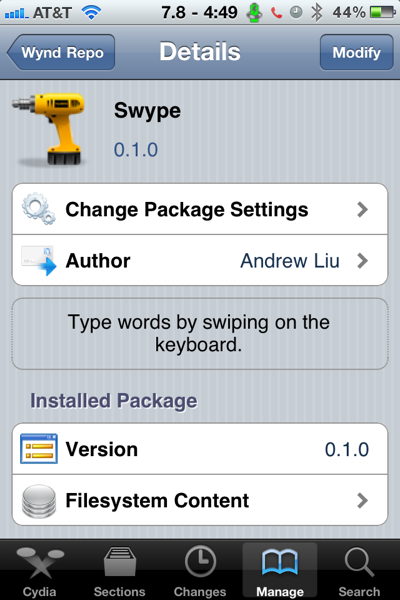
Those who’ve spent some time on the Android platform are probably aware of Swype, a tweak that lets users type on their virtual keyboards without ever lifting their fingers, by simply quickly swiping their finger across the keyboard over any letter in order to form a word, and only then releasing it. Fans of this tool should now be happy to know that Swype has now been unofficially ported to iOS.


With one continuous finger or stylus motion across the screen keyboard, the patented technology enables users to input words faster and easier than other data input methods—at over 40 words per minute.


Swype for iOS, although not official at this point, works similarly to the official version. After installing the tweak and restarting the device, users will immediately be able to type using this method. This tweak is still in beta form, therefore it’s expected to have its problems: for example, auto-correct often kicks in, although it’s not displayed, and will inadvertently change a word. That happens several times. If you’d like to type normally, you still can, even with Swype installed, although you’ll likely rather use the new method since it does a great deal to speed up your writing.

In order to install this, all you’ll need is a jailbroken iPod touch, iPhone or iPad, although we expect that this typing method will feel a lot more natural on smaller devices, not on large screens. In order to get it up and running, you’ll need to add the following repository to Cydia: wynd.x10.mx/repo

Photo

Jailbreakme.com version 3.0 now working on latest iOS

Posted by DjRaz55 Thursday, July 7, 2011 0 comments

The JailbreakMe.com website has returned to offer an entirely browser-based jailbreak tool for iOS devices including (for the first time) the iPad 2.


NewImage


Jailbreaking is a process by which Apple's iOS devices can be opened up to allow for installation of non-Apple-approved applications, customizations and file access. Apple officially disapproves of jailbreaking and has even warned users that these unauthorized modifications can cause "instability, disruption of services, and compromised security." Still, a large and active jailbreak community has emerged over the years since the iPhone's introduction.

A Dev-Team blog post outlines the supported configurations for JailbreakMe:


- iPad1: 4.3 through 4.3.3
- iPad2: 4.3.3 
- iPhoneGS: 4.3 through 4.3.3 
- iPhone4: 4.3 through 4.3.3 
- iPhone4-CDMA: 4.2.6 through 4.2.8 
- iPod touch 3g: 4.3, 4.3.2, 4.3.3 
- iPod touch 4g: 4.3 through 4.3.3


The JailbreakMe site is unique in that it allows users to jailbreak their devices entirely using the Safari browser and without downloading any additional software. The site itself also offers a Frequently Asked Questions page that reassures users that the jailbreaking process is fully reversible with a simple restore and that there is no risk for any permanent damage. Still, we'd recommend users proceed with caution. The installation process involves simply visiting JailbreakMe from a supported iOS device and tapping "Free/Install" button to initiate the jailbreak. 

The browser-based jailbreak process again exploits a flaw in Apple's PDF renderer that allows the tool to open up the device. Just like the previous vulnerability, Apple is expected to patch this one shortly. This same vulnerability could be exploited by malicious parties as well. The programmers of JailbreakMe are also providing a patch to close the security hole behind them for jailbroken users. Users of non-jailbroken iOS devices, however, will have to wait until Apple provides a fix.

iTunes 10.3.1 is Jailbreak Frindley

Posted by DjRaz55 Saturday, June 18, 2011 0 comments

NewImage


Itunes 10.3.1 is Jailbreak Friendley

IOS 5.0 Down Links (BETA)

Posted by DjRaz55 Saturday, June 11, 2011 0 comments


NewImage


Download iOS 5.0 Links

Here are the download links for iOS 5.0. Only Developers can download iOS 5.0, so unless you’re a developer you cannot download from the below links.

NOTE: Devices updated to iOS 5 beta can not be restored to earlier versions of iOS. Devices will be able to upgrade to future beta releases and the final iOS 5 software. You will also need to download iTunes 10.5 beta from the iOS Dev Center to activate iOS 5.0 beta.

iOS 5 jailbroken

Posted by DjRaz55 Tuesday, June 7, 2011 0 comments

NewImage

See those Cydia and iSSH icons? How about the Reminders and Newstand apps, see those? What you're looking at is the harmonious coexistence of hacks and Apple's virgin iOS 5 beta release running on a 4th generation iPod touch. In other words, MuscleNerd and Co are letting us know that iOS 5 presents few surprises so far when its comes to closing the existing holes exploited by the tethered limera1n jailbreak.

Update: It's worth mentioning that limera1n is a bootrom exploit that Apple can't patch on the iPod touch through firmware alone. The real test of the Dev Team's wits will be an untethered jailbreak for the iPad 2.

Today’s PwnageTool and redsn0w incorporate @i0n1c’s port to 4.3.3 (it’s ironic that such a long-lasting untether doesn’t even have an official name!).  It also of course uses geohot’s limera1n bootrom exploit to inject the jailbreak. The 4.3.3 untether works on all devices that actually support 4.3.3 except for the iPad2:

  • iPhone3GS
  • iPhone4 (GSM)
  • iPod touch 3G
  • iPod touch 4G
  • iPad1
  • AppleTV2G (v4.3 8F202

NewImage

Earlier this week, iOS 4.3.3 was released to fix the much talked about iOS location tracking bug.

NewImageCydia running on iOS 4.3.3, iPhone 4 (GSM)

NOTE: Those of you who rely on a carrier unlock MUST STAY AWAY from Redsn0w and stock iOS 4.3.3 firmware. Instead use PwnageTool for Mac, or Sn0wbreeze for Windows.

Step 1: Download iOS 4.3.3 for your version of iOS device.

Step 2: Update/Restore to iOS 4.3.3 firmware using the IPSW file you just downloaded via iTunes 10.2.2.

Step 3: Start Redsn0w and point it to the official iOS 4.3.3 firmware file.

NewImage

NewImage

Step 4: Now select “Install Cydia” and click “Next”. Optionally (if available), you can also select any other option you like.

NewImage

Step 5: Now make sure your device is both OFF and PLUGGED IN to the computer before you click “Next”.

NewImage

At this stage you will be presented with a screen where you will be guided on how to enter DFU mode. Quickly hold “Power” button and then while holding the “Power” button, you will now have to hold “Home” button too. Now after few seconds release “Power” button but keep holding “Home” button until installation begins.

NewImage

Step 6: Sit back and enjoy while Redsn0w does the rest for you. Once done, your iPhone, iPad or iPod touch will restart automatically and you will find it fully jailbroken (untethered) on the latest iOS 4.3.3 firmware.


Direct Download Links for iOS 4.3.3 / 4.2.8 (Official from Apple)


Download Redsn0w 0.9.6rc15

Update: Redsn0w 0.9.6rc16 has been released, the download links have been updated to reflect this.

Mac & Windows versions are available, these are direct download links:

Questions or Comments...


Your Name
Your Email
Subject
Message

About Me


Want something? Need something? Need to know how to do something that Apple, AT&T, or other companies may not want you to know? If you answered yes to any of these, your in the right spot... I prefer to stay anonymous as this could effect my paying job. So as far as everyone knows.. I am DJRaz55, which is me. Don't see what you need, feel free to email me. Email DJRaz55